
FlashpointBI · Product
Your ERP data, one question away.
FlashpointBI is an AI-powered business intelligence platform that connects directly to your ERP system and delivers answers through Microsoft Teams. No new logins. No pre-built reports. No waiting on IT.
FlashpointBI is patent-pending technology developed by YTBE, Inc.
Why FlashpointBI
Ask your ERP questions in Microsoft Teams.
Security
People only see what the ERP already lets them see.
FlashpointBI passes each person’s own sign-in through to NetSuite or SAP ByDesign, so the ERP’s permissions apply to every answer. Built for mid-market teams on either system.
Product demos
See it running
FlashpointBI in three minutes
Your ERP data in Microsoft Teams: live dashboards and plain-English answers.
Ask in plain English
Ask a question in plain English and get tables, charts and insights from the data you already hold. Follow up to drill deeper, filter or pivot to a new angle.
Every query runs under the asking user's own credentials, so sales reps see their accounts, managers see their teams, and finance sees the full picture.
Dynamic dashboards
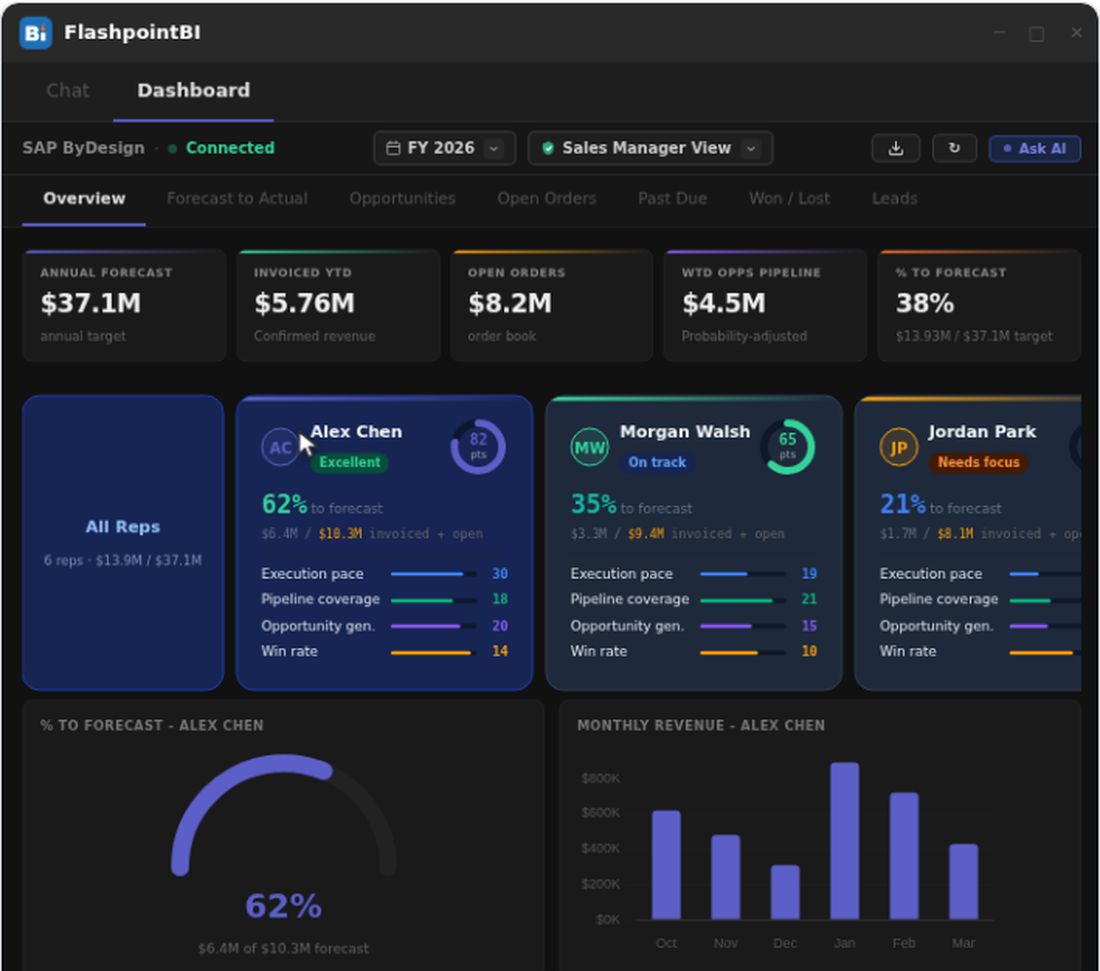
A live dashboard embedded as a tab in Microsoft Teams, next to the chat. KPIs, scorecards, pipeline charts and forecast gauges update straight from SAP ByDesign or NetSuite, with zero ETL. Each rep gets a scorecard covering execution pace, pipeline coverage, opportunity generation and win rate. See something in a chart? Ask the AI about it.
New in v2026.2: the dashboard greets you by time of day, the tabs sit above the rep filter, and a small (i) on every card explains how its figure is calculated. The headline cards keep their “How it’s calculated” button.
Traceability
Click any chart bar, pie wedge or table row to see the records behind it, sort by any column, and export to Excel in one click. In v2026.2 a drill-down opens as a full-width page with Back at the top left; Esc or your browser’s Back button returns you too. Share to Teams sends a drill-down to colleagues as an Excel file. Before anything goes out, FlashpointBI shows what will be sent and asks you to confirm that everyone you send it to is allowed to see the data.
Every card and drill-down has a data lineage view showing the exact ERP report, fields, filters and API query behind each value, so Finance can check that “Invoiced YTD” matches their P&L by running the query themselves. Cards the AI adds get the same lineage.
Ask AI about any card
Reference any card with # to give the AI its data source, calculation and current value, then ask it to explain the metric, break it down differently or change the visualization. The AI can add new cards backed by live ERP queries. Drag and drop to reposition, then publish for your team or keep a personal draft.
Edit mode adds inline editing and version history with rollback. Every AI-generated card inherits the same drill-down, sorting and data lineage as the built-in views.
Views and filters
Switch between Sales Manager, Finance, Executive and Operations views with one click. Each view shows the KPIs and charts for that function, and MS365 roles decide which views a person can open.
Filter any view by fiscal year or quarter. FlashpointBI maps your selection to the right date fields across every SAP report, so every KPI, chart and drill-down updates in seconds. The dashboard stores no copy of your data: every number is fetched live with the viewing user's own SAP credentials.
What your team can do today
Everything below works against your live ERP.
- Ask about pipeline, revenue, forecasts, open orders, invoices, or any data your ERP holds
- Get instant breakdowns by rep, stage, region, account, or time period
- Get charts and tables alongside plain-English answers
- Drill into any metric to see the individual records behind it
- Switch between Sales, Finance, Executive, and Operations views
- Filter by fiscal year or quarter with one click
- Reference dashboard cards by name and ask the AI to explain or modify them
- Add new dashboard cards through conversation, backed by live ERP queries
- Export any view to Excel with formatted data, formulas, and charts
- Trace every displayed number back to its exact ERP API query
FlashpointBI questions
The things people ask before the first call.
Does FlashpointBI keep a copy of our data?
The dashboard doesn't store copies of your data. Every number is fetched live using the viewing user's own SAP credentials and permissions.
Who can see what?
Every query runs under the asking user's own credentials. Your ERP's permission model is enforced automatically, so sales reps see their accounts, managers see their teams, and finance sees the full picture.
Which ERPs does it work with?
Built for mid-market teams running SAP ByDesign and NetSuite.
Where does each number come from?
Every card and drill-down includes a data lineage view showing the exact ERP report, fields, filters, and API query that produced the displayed values.
Can we change what the dashboard shows?
The AI can add new cards to your dashboard, backed by live ERP queries. Publish changes for your team or keep them as a personal draft.
How long does it take to deploy?
Setup typically takes days, depending on your ERP and permissions.
Ready to talk about your ERP?
Talk to us about using FlashpointBI with NetSuite or SAP ByDesign.